Relearning OCaml
Notes on OCaml
I have learned OCaml from the books of John Whitington. I have not programmed in OCaml for a long time. So I may have forgotten many features. This is another attempt to relearn this fine language from different perspective. I will be following Sylvain Conchon & Jean-Christophe Filliâtre [2025].
Installation
I have followed installation from official OCaml. And for installing essential OCaml libraries I used this script, which is basically opam install <name> on each line.
hello world
1
let () = print_string "Long time no see OCaml!\n"
Following is compiled using ocamlc. There is also ocamlnat for native executable and ocaml interpreter.
1
2
3
4
5
ocamlc hello.ml
ls
a.out*  hello.cmi  hello.cmo  hello.ml
./a.out
Long time no see OCaml!
There is also enhanced REPL called utop. Like interpreter, it can be launched from any terminal and executing utop and exited using ctrl+d. One of the enhancement of utop is tab suggestion. Tab autocomplete will work only if there is only one suggestion. Otherwise we need navigate using alt+ <- and alt+ -> and confirm the choice by pressing alt+ down-arrow-key.
Other useful command of utop is stashing, #utop_stash "<filename>" which will save OCaml commands along with their results in a textfile.
There is dedicated build-tool called dune for automating OCaml compilation. It is already installed using above shell script.
14 little programs (or First Steps with OCaml)
Leap Year (1st program)
first version will be taking input interactively:
1
2
3
4
5
6
7
8

let yr = read_int ()
let is_leap =
  (yr mod 4 = 0 && yr mod 100 <> 0) || yr mod 400 = 0
let msg = if is_leap then "is" else "is not"
let () = Printf.printf "%d %s leap year\n" yr msg
1
2
3
4
5

> ocamlc leap_year.ml -o leap_year
> ./leap_year
2026
2026 is not leap year
Things to note:
=tests for equality if not used withlet.- logical or is
||and logical and is&&like C but logical negation isnot. There are evaluated lazily from left to right. let () = somethingis an expresion that evaluates right hand side and checks if it returns nothing , aka()unit in OCaml parlance.- There is no
mainentry point for program. All the statement is evaluated from top to bottom.
Commandline version:
1
2
3
4
5
6
7
8

let yr = int_of_string Sys.argv.(1)
let is_leap =
  (yr mod 4 = 0 && yr mod 100 <> 0) || yr mod 400 = 0
let msg = if is_leap then "is" else "is not"
let () = Printf.printf "%d %s leap year\n" yr msg
1
2
3

❯❯❯ ./leap_year 2016
2016 is leap year
Note:
- To use features from the other module, we have to write module and variable name separated by dot. Above we have used
Sys.argvto retrive array of stringsargvfromSysmodule. If module is not in the standard library then we need to import it. - Array element is accessed by index using following systax -
<array>.(<index>). int_of_stringbelongs to moduleStdlib, so need to specify module name in this case.
Usually, when working with toplevel (REPL), inferred type is shown. There is another way to find out:
1
2
3
4
5

❯ ocamlc -i leap_year.ml
val yr : int
val is_leap : bool
val msg : string
int is the processor native interger. A integer constant can be written in decimal, binary (prefixed 0b), octal (prefixed 0o) or hexadecimal (prefixed 0x). So, decimal constant 15 can be written as 0o17 in octal, 0b1111 in binary and 0xF in hexadecimal. For clarity, numbers can be separated using _. Example:
1
2
utop # 0xff_ff + 99_99;;
- : int = 75534
We can specify we want to use int32 (or int64) by suffix l (or L), such as 42l and 999_999_999L.
Character is represented using char type. It is written within single quote. Non-printable character is specified using \ like \n and \\. We can specify char using their ASCII code in decimal (\ddd) and hexadecimal (\xdd). Example:
1
2
3
4
5
6
7
8
9
10
# 'a';;
- : char = 'a'
# '\n';;
- : char = '\n'
# '\\';;
- : char = '\\'
# '\x7e';;
- : char = '~'
# '\127';;
- : char = '\127'
We can find ASCII code or char given code using two functions: Char.code and Char.chr.
The string is represented by string type and is double quoted "". Examples:
1
2
3
4
5
6
7
8
9
10
11
12
13

# "✖ ✱";;
- : string = "✖ ✱"
# let s = "12345";;
val s : string = "12345"
# s.[3];;
- : char = '4'
# "123\123123";;
- : string = "123{123"
# String.length s;;
- : int = 5
# "1+1="^"5";;
- : string = "1+1=5"
monte-carlo method (2nd program)
We will be approximating value of pi using this method. Idea is to find probability of point to lie inside the quarter circle inscribed within square of unit one, if point is randomly assigned anywhere inside the unit square. We know thoretically it is equal to pi/4. We will get pi by multiplying empirical value by 4.
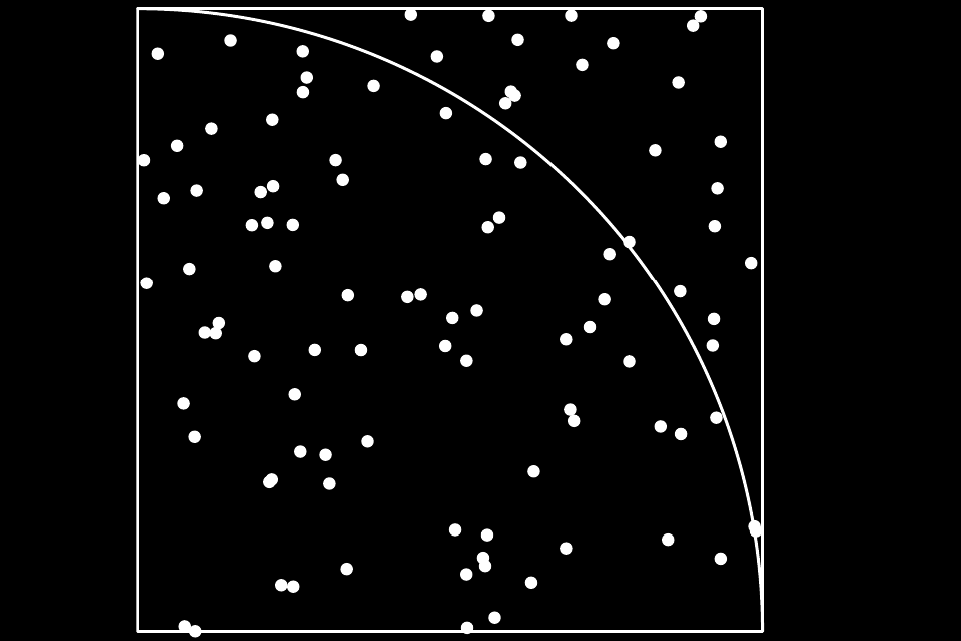 Pi approximation using Monte-Carlo method
1
2
3
4
5
6
7
8
9
10
11
12
13

let n = int_of_string Sys.argv.(1)

let () =
  let points_inside_circle = ref 0 in
  for _ = 1 to n do
    let x = Random.float 1.0 in
    let y = Random.float 1.0 in
    if x *. x +. y*.y <= 1.0 then
    points_inside_circle := !points_inside_circle + 1
  done;
  let pi = 4.0 *. float !points_inside_circle /. float n in
  Printf.printf "%f\n" pi
1
2
3
4
5
6
7
8
9

~/c/o/first-steps ❯❯❯ ./approx_pi 100
3.040000
~/c/o/first-steps ❯❯❯ ./approx_pi 500
3.136000
~/c/o/first-steps ❯❯❯ ./approx_pi 1000
3.140000
~/c/o/first-steps ❯❯❯ ./approx_pi 99999
3.148511
Note:
- There is only one
floattype of 64bit which follows IEEE 754 standard. - All floating point numbers should end with
.if nothing after decimal, except scientific notation (eg1e6). - There are corresponding floating point arithemetic operator like
+.,-.,/.,*.and**. - We cannot operate on
intandfloatsimultaneously in an expression. We need to convert all numbers to int or float.truncateandfloatfunction can be used to conversion. E.g. :42 /. float 3andtruncate (exp 1.) refkeyword is used to create a mutable variable. It is a special kind ofrecordtype with only one field. It can be accessed by prefixing variable with!like!points_inside_circleand can be later updated using:=likepoints_inside_circle := !points_inside_circle + 1.
let-in defines scope of variables. The variable defined before in are visible after it but variable defined after it are only visible after it and when expression ends those variable goes out of the scope.
Example:
1
2
3
4
5
6
7
8
9
10
11
12
13
14
15
16

─( 20:53:17 )─< command 0 >─────────────────────────────────{ counter: 0 }─
utop # let x = x + 5;;
Error: Unbound value x
─( 20:53:17 )─< command 1 >─────────────────────────────────{ counter: 0 }─
utop # let x = 6 in x*6 ;;
- : int = 36
─( 20:55:56 )─< command 2 >─────────────────────────────────{ counter: 0 }─
utop # let x = 2 in let y = x * 2 in let z = w * y in let w = 2;;
Error: Syntax error
─( 20:56:26 )─< command 3 >─────────────────────────────────{ counter: 0 }─
utop # let x = 2 in let y = x * 2 in let z = w * y in let w = 2 in w * 2;;
Error: Unbound value w
─( 20:57:53 )─< command 4 >─────────────────────────────────{ counter: 0 }─
utop # (let x = 1 in x*2) + x;;
Error: Unbound value x
Expression of for loop is evaluated only once. This happens before entering loop’s body. Example:
1
2
3
4
utop # for i = (Printf.printf "a"; 4) downto (Printf.printf "e"; 0) do
         Printf.printf "%d" i
       done;;
ae43210- : unit = ()
drawing a cardioid (3rd program)
The cardiod is a curve that represents the trajectory of a fixed point of circle which is rolling on another circle of same radius. It is defined by following parameteric equation:
 Cardiod Equation
where a is radii of the circles.
create a dune project:
1
2
3
4

❯❯❯ dune init project cardioid
Entering directory '/home/i3/c/ocaml/first-steps/cardioid'
Success: initialized project component named cardioid
create cardioid.ml file inside the root of project folder with following content:
1
2
3
4
5
6
7
8
9
10
11
12
13
14
15
16
17

open Graphics

let () = open_graph " 300x200"

let radius = 50.
let n = 200

let () =
  moveto 200 150;
  for i = 0 to n do
    let theta = atan 1. *. float i *. 8. /. float n in
    let factor = radius *. (1. -. sin theta) in
    lineto (150 + truncate (factor *. cos theta))
           (150 + truncate (factor *. sin theta))
  done;
  ignore (read_key ())
Compile and run from the root folder using dune exec ./cardioid.exe.
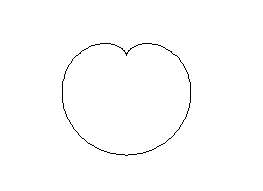 Cardioid image
the mandelbrot set (4th program)
The Mandelbrot set is defined as the set of points (x, y) for which following sequences do not tend to infinity in absolute value.
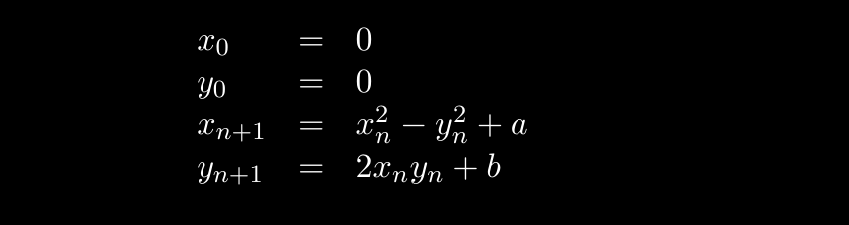 Sequences defining Mandelbrot set
It is known that sequence tend to infinity as soon as x_n**2 + y_n**2 > 4.
1
2
3
4
5
6
7
8
9
10
11
12
13
14
15
16
17
18
19
20
21
22
23
24
25
26
27
28
29
30
31
32
33
34
35
36
37
38

open Graphics

let width = 800
let height = 800

(* no of terms to compute of sequence *)
let k = 100

let norm2 x y = x *. x +. y *. y

(* checks if (x, y) points belong to mandelbrot set*)
let mandelbrot a b =
  let rec mandel x y i =
    if i = k || norm2 x y > 4. then i = k
    else
      let x' = x *. x -. y *. y +. a in
      let y' = 2. *. x *. y +. b in
      mandel x' y' (i+1)
  in
  mandel 0. 0. 0

(* checks pixel if it lies in mandelbrot set then colors that pixel black otherwise pixel is left as it is*)
let draw () =
  for w = 0 to width - 1 do
    for h = 0 to height - 1 do
      let a = 4. *. float w /. float width -. 2. in
      let b = 4. *. float h /. float height -. 2. in
      if mandelbrot a b then plot w h
    done
  done

let () =
  let dim = Printf.sprintf " %dx%d" width height in
  open_graph dim;
  draw ();
  ignore (read_key ())
Compiling and executing we get
1
2
ocamlopt -I `ocamlfind query graphics` graphics.cmxa mandelbrot.ml -o mandelbrot
./mandelbrot
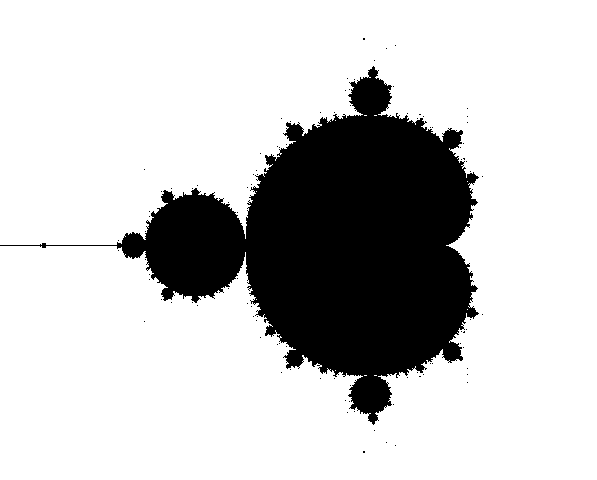 Output
I had similar program which had following output.
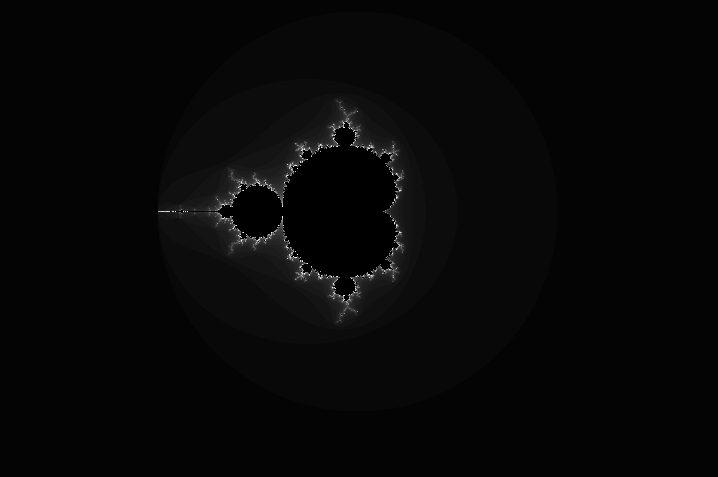 Visualization of Mandelbrot Set
Note:
Printf.sprintfcan be used to return formatted string.- Function follows similar scoping rules as the variables.
- Recursive function definition has
recbefore function’s name. - Mutually recursive function must be defined simultaneously using the keyword
and. Example:
1
2
3
4

let rec f x = ... g ...
and     g x = ... f ...
the sieve of eratosthenes (5th program)
It is algorithm for finding the primes numbers upto given number N. Idea is to start with a list of numbers from 2 to N. We pick first uncrossed number (number which is not yet been eliminated as composite number). We then leave that number as it is but mark all its multiples as crossed (meaning as eliminated from primes). Then we repeat this process for next uncrossed number. This stops when current uncrossed number n satisfies n*n > N.
1
2
3
4
5
6
7
8
9
10
11
12
13
14
15
16
17
18
19
20
21
22
23
24
25
26
27
28
29
30

let () = print_string "N = "
(* largest number to check for number *)
let max = read_int ()

(* stores if i is prime or not, where i is the index of the array *)
let is_primes = Array.make (max + 1) true

let () =
  is_primes.(0) <- false;
  is_primes.(1) <- false;
  let limit = truncate (float max ** 0.5) in
  for n = 2 to limit do
    if is_primes.(n) then begin
      let m = ref (n*n) in
      while !m <= max do
        is_primes.(!m) <- false;
        m := !m + n
      done
    end
  done

(* iterating through is_primes and printing all the primes less than or equal to max *)

let () =
  print_endline "Primes less or equal to N";
  for i = 0 to Array.length is_primes - 1 do
    if is_primes.(i) then Printf.printf "%d\n" i;
  done
1
2
3
4
5
6
7
8
9
10
11
12
13
14
15
N = 42
Primes less or equal to N
2
3
5
7
11
13
17
19
23
29
31
37
41
Slightly less efficient version in C
Note:
begin-endworks in the same way as()but convention is to used them to group the instructions that are imperative in nature.- Array can be explicitly constructed by
let arr = [|3; 2; 1|];;. It can be also be nested likelet matrix = [| [|1; 0|]; [|0; 1|]|]
To initialize a matrix of given dimension, use
Array.make_matrixinstead of nestedArray.make.
drawing a curve (6th program)
This program will join 2d points by lines in order of points having smaller abcissa , i.e., points are joined from left to right.
1
2
3
4
5
6
7
8
9
10
11
12
13
14
15
16
17
18
19
20
21
22
23
24
25
26
27
28
29
30

open Graphics
let width = 500
let height = 500

(* function for reading coordinates form stdin *)
let read_pair () =
  print_string "x = "; let x = read_int () in
  print_string "y = "; let y = read_int () in
  (x, y)

let n = print_string "No of coordinates: "; read_int ()
(* reading n number of coordinates from user *)
let coordinates = Array.init n (fun i -> read_pair ())

let cmp (x,y) (x2,y2) = x - x2
(* sorting points increasing order of x *)
let () = Array.sort cmp coordinates

let draw () =
  moveto (fst coordinates.(0)) (snd coordinates.(0));
  for i = 1 to n-1 do
    let (x, y) = coordinates.(i) in
    lineto x y
  done;
  ignore (read_key ())

let () =
  open_graph (Printf.sprintf " %dx%d" width height);
  draw ()
1
2
3
4
5
6
7
8
9
ocamlopt -I /home/i3/.opam/default/lib/graphics graphics.cmxa plot.ml -o plot
./plot
No of coordinates: 3
x = 10
y = 10
x = 250
y = 480
x = 490
y = 10
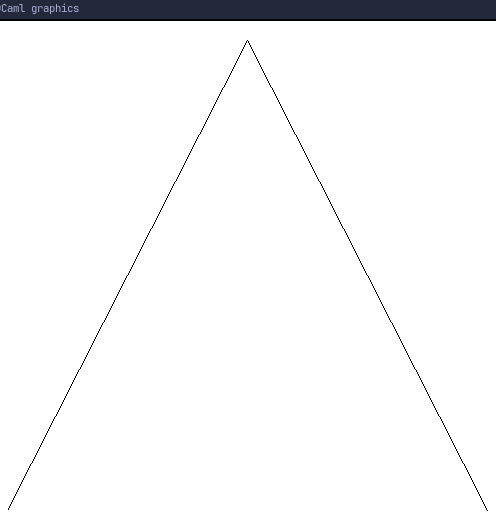 Output
In OCaml, functions are treated as values and are called first-class values. And those functions that receive other functions as arguments is called higher-order function.
Tuple types
(int * int) * int,int * (int * int)andint * int * intare different types:
- the first type has first pair of
intas first component andintas second component- the second type has
intas first component and pair ofintas the second component- the third type is triple of
ints.
wild card pattern
If we are trying to find certain components for tuple we can do so as follows.
1
2
3
4
5
6
7
8
9
10
11
12
13
14
15
16
17
18

utop # let x, (y, z), t = (42, ('a', "adi"), 0.);;
val x : int = 42
val y : char = 'a'
val z : string = "adi"
val t : float = 0.
─( 01:43:05 )─< command 1 >─────────────────────────────────{ counter: 0 }─
utop # x;;
- : int = 42
─( 01:44:50 )─< command 2 >─────────────────────────────────{ counter: 0 }─
utop # y;;
- : char = 'a'
─( 01:44:56 )─< command 3 >─────────────────────────────────{ counter: 0 }─
utop # z;;
- : string = "adi"
─( 01:45:00 )─< command 4 >─────────────────────────────────{ counter: 0 }─
utop # t;;
- : float = 0.
Suppose we only need x and z, then we could do instead:
1
2
3
4

utop # let x, (_, z), _ = (42, ('a', "adi"), 0.);;
val x : int = 42
val z : string = "adi"
If we only require x and t. Then :
1
2
3
4

utop # let x, _ , t = (42, ('a', "adi"), 0.);;
val x : int = 42
val t : float = 0.
Above - wild character helps us avoid unnecessary variables.
records (or tuples with named componenets)
Records need to be defined before they be used in variable. Example:
1
2
3
4
5
6
7
8
9
10
11
12
13
14
utop # type point = { x : int; y : int};;
type point = { x : int; y : int; }
─( 01:54:42 )─< command 8 >─────────────────────────────────{ counter: 0 }─
utop # let o = {x = 0; y = 0};;
val o : point = {x = 0; y = 0}
─( 02:20:03 )─< command 9 >─────────────────────────────────{ counter: 0 }─
utop # o;;
- : point = {x = 0; y = 0}
─( 02:20:37 )─< command 10 >────────────────────────────────{ counter: 0 }─
utop # o.x;;
- : int = 0
─( 02:20:43 )─< command 11 >────────────────────────────────{ counter: 0 }─
utop # o.y;;
- : int = 0
Since, they fields are named, so when initializing them we specify value of field in any order like let p = {y=1; x=0}.
It is also possible to create a new record with selected values from existing record. Example:
1
2
3
4
5
6
7
8
9
10
11

type account = {
  name : string;
  address : string;
  acc_no : string;
  mutable balance : int;
}

let adi = {balance = 100; acc_no = "123"; address = "Milky way"; name = "adi"}

let adi2 = { adi with balance = 1000; acc_no = "125"};;
Note mutable modifier is used in defining a record, so that record of that type created later can be updated without creating a new record. Syntax for updating mutable field f of a record r is r.f <- r.f + some_value. This declaration is imperative so it return unit ().
anonymous function
The syntax for defining such function is as follows:
1
2
fun <param1> <param2> ... <paramn> -> <some_expression_using_parameters>
We can name them too like let f = fun x -> x + 1.