Getting Rusted
Following the instruction from official guide.
Installation
1
$ curl --proto '=https' --tlsv1.2 https://sh.rustup.rs -sSf | sh
check installed version of the compiler
1
rustc --version
update and install
1
2
3
4
# update to latest version
rustup update
# remove the rust itself
rustup self uninstall
install lsp
for some reason, official install didn’t properly install the lsp (i.e. it might be on $PATH but do not work), we need to manually install it
1
rustup component add rust-analyzer
hello world
1
2
3
fn main() {
    println!("Hello, world!");
}
it can be compiled using rustc hello.rs. By default, rust comes with a formatter and can be used as usual in helix - :fmt.
set up project using cargo
cargo is build-system and package manager too.
To create project using cargo
1
cargo new <new_folder>
This will create a new folder and toml file with following structure.
1
2
3
4
5
6
7

[package]
name = "hello_cargo"
version = "0.1.0"
edition = "2026"

[dependencies]
Additionally, cargo intializes local git repository and also creates .gitignore file if created outside any git tracked directory.
If project folder is already created then to initialize a project using do the following:
Move the all the source code in a new folder called
srcin the the root directory of the project. For example, if the project folder isprojectthen all the source file will be inproject/src.Execute
cargo initin theprojectdirectory. What it will do is create a newCargo.tomlinside project directory.
build and run a cargo project
Now project can simply be built using executing cargo build inside the project’s directory. This will create new folder inside the project’s directory called /target which contains executable binary along with other stuffs. Moreover, it creates a file called Cargo.lock - its purpose is to document dependencies version.
To run, execute cargo run. This command can also be used to compile and run in one go.
We have cargo check to quickly check if source code can be compiled without compiling it because it is faster than producing the executable.
To compile code with optimization we have build using cargo build --release. Compilation is slow but executable is fast.
External libraies
External libraries is distributed as crate (a collection of Rust source files). To use a library crate, add that crate name with version in Cargo.toml.
For example,
1
2
[dependencies]
rand = "0.8.5"
We can now use external library in our project. Commands for building and running is same - cargo build and cargo run.
It is also updates the Cargo.lock.
To use newer version of library, modify versions of the crates in the Cargo.toml and execute cargo update.
To consult doc of libraries that we are currently using inside our project, run cargo doc --open and it will open up browser with local copy of docs which it just downloaded.
Variable and Mutability
In Rust, variable are immutable by default. We have special syntax for declaring a mutable variable.
So, trying to modify a mutable variable results in error. For example:
1
2
3
4
5
6
fn main() {
    let x = 5;
    println!("The value of x is: {x}");
    x = 3;
    println!("The value of x is: {x}");
}
We can declare mutable varible by prefixing variable name with mut keyword. For example:
1
2
3
4
5
6
fn main() {
    let mut x = 5;
    println!("The value of x is: {x}");
    x = 3;
    println!("The value of x is: {x}");
}
constants
Constants are also immutable and major difference between constant and immutable variable is that constant are declared with type annotation of type and only contain constant expression which can evaluated at compile time.
For example it is decalred as const SPEED_OF_LIGHT: u32 = 299792458;.
It has usual scoping rules.
Shadowing
Variable with the same name can be recreated in the same scope. The previous value of the variable is discarded and new value is used until new variable is created with the same name. This is called shadowing.
For example:
1
2
3
4
5
6
7
8
9
10
11
12
13
14
15

fn main() {
    let x = 5;
    println!("The value of x is: {x}");
    let x = 3;
    println!("The value of x is: {x}");

    {
        let x = x * 5;
        println!("The value of x is: {x}");
    }

    println!("The value of x is: {x}");
}
1
2
3
4
The value of x is: 5
The value of x is: 3
The value of x is: 15
The value of x is: 3
One important thing to note that we are effectively creating a new variable everytime we do shadowing, so we can change type of the variable while reusing the same name. On the other hand we can only change value of the mutable variable but not the type.
Data types
In rust, every value is associated with a data type. There are two types of data types: scalar and compound.
There are four types of scalar:
- integer
- float
- boolean
- char
integer
There many variants of ints based on size and signed/unsigned, summarized in the table below.
| Length | Signed | Unsigned |
|---|---|---|
| 8 bit | i8 | u8 |
| 16 bit | i16 | u16 |
| 32 bit | i32 | u32 |
| 64 bit | i64 | u64 |
| 128 bit | i128 | u128 |
| Architecture-dependent | isize | usize |
Number literals can be specified in the different bases as summarized in the table below.
| Number literals | Example |
|---|---|
| Decimal | 12_345 |
| Hexadecimal | 0xff |
| Octal | 0o17 |
| Binary | 0b1_000 |
| Byte (u8 only) | b’A’ |
Things to keep in mind:
- When rust infers a int, it defaults to i32.
- If we want specific type, literal can be suffixed with type like so
42u8. - If overflow happens it is handled differently depending on compilation mode. In dev mode , compiler throws an error. In release mode, compiler does wrapping (of 2’s complement).
_can be used as visual separator between the digits.- Range of n bit signed int is -(2^(n-1)) to 2^(n-1)-1.
- Range of n bit unsigned int is 0 to 2^n -1.
float
There are two types of floats: f32 (32 bit) and f64. It is represented according to the IEEE-754 standard.
numeric operations
The important thing to note that integer division is rounded to nearest integer. Everthing else is as usual. Example:
1
2
3
4
5
6
7
8
9
10

fn main() {
    println!("1 + 2 = {}", 1 + 2);
    println!("1 - 2 = {}", 1 - 2);
    println!("5 / 3 = {}", 5 / 3);
    println!("-5 / 3 = {}", (-5) / 3);
    println!("2.3 * 1.7 = {}", 2.3 / 1.7);
    println!("5 % 2 = {}", 5 % 2);
}
1
2
3
4
5
6
7

1 + 2 = 3
1 - 2 = -1
5 / 3 = 1
-5 / 3 = -1
2.3 * 1.7 = 1.352941176470588
5 % 2 = 1
boolean
There are two types of boolean: true and false. Example:
1
2
3
4
fn main() {
  let t = true;
  let f: bool = false;
}
char
Rust stores char literals using unicode scalar value and is of size 4 bytes (as opposed to 1 byte in C which can only store ASCII value). Example:
1
2
3
4
5
6

fn main() {
    let c = 'z';
    let z: char = 'ℤ'; // with explicit type annotation
    let heart_eyed_cat = '😻';
}
Note : A unicode scalar value range from U+0000 to U+D7FF and U+E000 to U+10FFFF inclusive.
tuple
It is a collection of values of heterogenous data type. It is of fixed size and once declared then it cannot be modified. We can do pattern matching similar to OCaml and Python. Example:
1
2
3
4
5
6
7
8
9
10
11
12
13

fn main() {
    let tup: (i32, f64, u8) = (500, 6.4, 1);
    println!("{:?}", tup);

    let t = (1, 42.3, 'A');

    let (x, y, z) = t;
    println!("The value of x = {x}, y = {y}, z = {z}");

    println!("Accessing 1st element of tup = {}", tup.0);
}
1
2
3
(500, 6.4, 1)
The value of x = 1, y = 42.3, z = A
Accessing 1st element of tup = 500
The tuple with no values is called unit and written as (). Expressions implicitly return this type if they do not return anything.
array
It is a collection of values of same type and has fixed length. Example:
1
2
3
4
5
6
7
8
9
10
11
12

fn main() {
    // simple array initialization
    let a = [1, 2, 3, 4];

    // specifying type and size
    let a: [i32; 5] = [1, 2, 3, 4, 5];

    // specifying array of size 10 with initital value 0
    let a = [0; 10];
}
We can access each element like so a[n].
functions
Rust does not care if function which we are calling inside the main is defined after main or before it, as long as it is in scope.
This is quite different from C/C++ where we would have to give function declaration (function prototype) if we want to define function after the main and call it in main.
Example:
1
2
3
4
5
6
7
8
9
10

fn main() {
    println!("Hello, world!");
    some_fun();
}

fn some_fun() {
    println!("Called some_fun()");
}
1
2
Hello, world!
Called some_fun()
parameters
Rust requires type of parameters to be specified.
Example:
1
2
3
4
5
6
7
8
9

fn main() {
    some_fun(3);
}

fn some_fun(x: i32) {
    println!("{x} was passed.");
}
1
3 was passed.
statements and expressions
Statements are instructions that does something but do not return a value. Expressions are instructions that evaluates to a value. That value is returned.
In Rust, assignment is a statement. So chain assignment is not possible unlike C or Python. Something like let x = (let y = 0)will result in error.
Examples of expressions include math expression, called function, called macro. A new scope block created with curly brackets is an expression. Example:
1
2
3
4
5
6
7
8
fn main() {
    let y = {
        let x = 5;
        x * 5
    };

    println!("Value of y: {y}");
}
1
Value of y: 25
Like OCaml, Rust uses semicolon ; to separate statements and expression do not need ; at the end. Sufixing expression with ; turns it into statement which will return unit type ().
return values of function
When we want to return a value from a function we have annotate it using arrow ->. Much like OCaml, the last expression in a function body serves as the return value of the function. We could also do return expression;. Example:
1
2
3
4
5
6
7
8
9

fn main() {
    println!("{}", five());
}

fn five() -> i32 {
    5 // or return 5;
}
1
5
control flow
The control flow is a language construct that helps to execute the statements selectively and repeatedly.
if Expressions
In Rust, conditional expression is not enclosed within (). In many languages if we put any other expression instead of conditional expression, compiler(or interpreter) tries to evaluate (or convert) into boolean value. But Rust throws error in this case. Example:
1
2
3
4
5
6
7
8
9
10

fn main() {
    let not_zero = 5;

    if not_zero {
        println!("Not a zero.");
    } else {
        println!("Zero");
    }
}
1
2
3
4
5
6
7
8
9
10
11

> cargo run
   Compiling control-flow v0.1.0 (/home/i3/c/rust/control-flow)
error[E0308]: mismatched types
 --> src/main.rs:4:8
  |
4 |     if not_zero {
  |        ^^^^^^^^ expected `bool`, found integer

For more information about this error, try `rustc --explain E0308`.
error: could not compile `control-flow` (bin "control-flow") due to 1 previous error
The block of code associated with each if expression is called arm.
multiple conditions with else if
Example:
1
2
3
4
5
6
7
8
9
10
11
12
13
14
15
fn main() {
    let n = 6;

    print!("{n} is divisible by");

    if n % 4 == 0 {
        println!(" 4");
    } else if n % 3 == 0 {
        println!(" 3");
    } else if n % 2 == 0 {
        println!(" 2");
    } else {
        println!(" 1");
    }
}
1
6 is divisible by 3
Here, 6 is divisble by 3 as well as 2, but this whole conditional will only execute first true statement only as in many languages.
using if in a let statement
As if is an expression, we can use it right side of a let statement to assign the outcome to a variable.
Example:
1
2
3
4
5
6
7
8
9
10
11
12
13
14
15
16
17
18
19
20
21
22
23
use std::io;

fn main() {
    let mut num = String::new();

    println!("Enter a number:");

    io::stdin()
        .read_line(&mut num)
        .expect("Could not read the value");

    let num: i32 = match num.trim().parse() {
        Ok(n) => n,
        Err(_) => {
            println!("Input is not a number!");
            return;
        }
    };

    let num = if num % 2 == 0 { "even" } else { "odd" };

    println!("Entered number is {num}.");
}
1
2
3
Enter a number:
5
Entered number is odd.
Note: The blocks of code demarcated by {} evaluates to last expression in them (and last expression does not end with ;). Also, all the arms of if expression should evaluate to same type. Otherwise, compiler will throw an error. Example:
1
2
3
4
5
6
7
8
9

fn main() {
    let condition = false;

    let value = if condition { 1 } else { "one" };

    println!("value: {}", value);
}
1
2
3
4
5
6
7
8
9
10
error[E0308]: `if` and `else` have incompatible types
 --> src/main.rs:4:43
  |
4 |     let value = if condition { 1 } else { "one" };
  |                                -          ^^^^^ expected integer, found `&str`
  |                                |
  |                                expected because of this

For more information about this error, try `rustc --explain E0308`.
repeating code with loop
It is a forever loop. We can exit this loop (or any variant of loop ) using break statement. Example.
1
2
3
4
5
fn main() {
    loop {
        println!("forever and ever");
    }
}
returning values from loops
We can return values from the loop and use it as expression. Example:
1
2
3
4
5
6
7
8
9
10
11
12
13
14
15
16

fn main() {
    let mut counter = 0;
    let mut accumulator = 1;

    let two_raised_ten = loop {
        accumulator *= 2;
        counter += 1;
        if counter == 10 {
            break accumulator;
        }
    };

    println!("Two raised to power ten: {two_raised_ten}");
}
1
Two raised to power ten: 1024
Note: return can also be used to exit the loop but it has unintended (or intended) effect of exiting the current function.
name the loops using loop label
If we have nested loop then break and continue applies to innermost loop only. We can label loop so that we can later specify which one we mean we call break and continue.
Example:
1
2
3
4
5
6
7
8
9
10
11
12
13
14
15
16
17
18
19
20
21
22
23

fn main() {
    let mut row = 1;

    'outer: loop {
        let mut column = row;

        loop {
            if row == 5 {
                break 'outer;
            }
            print!("{column}    ");
            column += row;

            if column == row * 4 {
                break;
            }
        }
        println!();
        row += 1;
    }
}
1
2
3
4
1    2    3
2    4    6
3    6    9
4    8    12
conditional loop with while
Example:
1
2
3
4
5
6
7
8
9
10
11

fn main() {
    let mut sum = 0;
    let mut c = 1;
    while c <= 100 {
        sum += c;
        c += 1;
    }

    println!("Sum of whole no upto 100: {sum}");
}
1
Sum of whole no upto 100: 5050
looping through a Collection with for
In Rust, there is canonical way to iterate through an array (or similar data structure) throught the use for loop. It is considered safer and faster alternative to other loop. Example:
1
2
3
4
5
6
7
8
9

fn main() {
    let a = [1, 2, 3, 4, 5];

    for element in a {
        println!("{}", element);
    }
}
1
2
3
4
5
1
2
3
4
5
There is Python equivalent of range function for iteration through the for loop. Example:
1
2
3
4
5
6
7
8

fn main() {
    for i in (1..4).rev() {
        println!("{i}");
    }
    println!("Liftoff!");
}
1
2
3
4
3
2
1
Liftoff!
ownership
The what makes Rust Rust is the idea of ownership. It is the set of rules that dictates how Rust program manages the memory.
In other languages like C, memory management works as follows. First there are two different areas of memory : stack and heap. Any data whose size is known and fixed is placed in the stack (data like numeric literals, string literals and booleans come under this category). Other data items, like string buffers, whose size is dynamic and not known at compile time are placed in the heap (by calling malloc or similar).
The way stack works is, whenever we assign a variable or pass data (fixed size and small enough so that it is copied) to function, that data is copied in the stack memory. When variable goes out of scope or the function returns the data is freed from the stack. All the data item is stored consecutively (except the padding) in the stack. It is follows usual LIFO pattern.
The data placed in the heap memory are not stored consecutively and it also has other component in the stack that stores the reference (address of the data in the heap). To allocate data on heap, there is extra step (unlike stack) which consist of finding unused space in memory that is not used by other, is of required size and mark it is in current use; instead of just copying the data in the heap. Also data access is also different, as we first have to get the address and then go to that address to get the data. The data placed in the heap can only be ever freed when manually done (using free). Some garbage collected (GC) based languages free heap data when there is no variable which is pointing to heap data. This comes at cost of runtime overhead.
The system languages like C suffers problem which results from poor memory management (of heap) which has to be done manually. If we forget to free the memory that we allocated that will lead to wastage. If we free the memory too early, it will result in undefined behavior. If we do it more than once, it will still result in a bug.
The ownership helps us to pair one allocation with one free.
the ownership rules
- Each value in Rust has an owner.
- There can be only be one owner at a time.
- When the owner goes out of scope, the value will be dropped.
variable scope
Example:
1
2
3
4
5
6
7
8
9

fn main() {
    {
        let n = 42;
        println!("Inside the new block scope: {n}");
    }
    // here n is goes out of scope
    println!("Outside the block scope: {n}");
}
1
2
3
4
5
6
7
8
9
10
11
12
For more information about this error, try `rustc --explain E0425`.
  --> src/main.rs:7:41
  |
7 |     println!("Outside the block scope: {n}");
  |                                         ^
  |
help: the binding `n` is available in a different scope in the same function
 --> src/main.rs:3:13
  |
3 |         let n = 42;
  |             ^
the string type
We will use string type which uses ownership concept. Following string creates a mutable string which lives on heap ( string literal which is immutable).
Double colon
::is used here specify the namespace just like C++.
1
2
3
4
5
fn main() {
    let mut greet = String::from("hello, ");
    greet.push_str("universe");
    println!("{greet}");
}
1
hello, universe
Here, String::from allocates the memory on the heap. When runtime system encounter }, Rust calls drop funtion automatically on each heap variable which frees the memory on the heap.
Similar pattern of resource disallocation exists in C++ called Resource Allocation Is Initialization.
variable and data interacting with Move
In case of the variable of simple data type (which has fixed size and small enough), if we try to reassign it to different variable it will just copy the contents. Example:
1
2
3
4
5
6

fn main() {
    let x = 3;
    let y = x;
    println!("{x} and {y}");
}
1
3 and 3
But it in the case of variable pointing to data on the heap, when we reassign original variable to another variable, the ownership to new variable and the original variable goes out of scope. Example:
1
2
3
4
5
6
7

fn main() {
    let original = String::from("rust");
    let moved = original;

    println!("moved = {moved} and original = {original}");
}
1
2
3
4
5
6
7
8
9
10
11
12
13
14
15
16
17
18
 error[E0382]: borrow of moved value: `original`
 --> src/main.rs:5:47
  |
2 |     let original = String::from("rust");
  |         -------- move occurs because `original` has type `String`, which does not implement the `Copy` trait
3 |     let moved = original;
  |                 -------- value moved here
4 |
5 |     println!("moved = {moved} and original = {original}");
  |                                               ^^^^^^^^ value borrowed here after move
  |
  = note: this error originates in the macro `$crate::format_args_nl` which comes from the expansion of the macro `println` (in Nightly builds, run with -Z macro-backtrace for more info)
help: consider cloning the value if the performance cost is acceptable
  |
3 |     let moved = original.clone();
  |                         ++++++++

For more information about this error, try `rustc --explain E0382`.
The compiler output clearly suggest that original variable is no longer valid. It has moved to moved variable. As we mentioned earlier, Rust frees heap variable when block ends by calling drop on each heap variable. But we have more than one variable refering to same heap data, then it will result in multiple frees.This borrowing mechanism avoids that.
In Python, if we assign a variable storing heap data (like List) to another variable, it creates a shallow copy. So both variable point to same location in heap. In Rust, there is no such concept. What we have is move ownership to another. It has concept of deep copy though where heap data is cloned.
scope and assignment
Whenever we try to assign new value to variable that is storing heap data initially, the variable will store new value and previous heap data will be deallocated immediately.
variables and data interacting with clone
If we want do deep copy of heap data along with stack data associated with a variable, we can run clone method on it.
1
2
3
4
5
6
7
fn main() {
    let s = String::from("ciao");
    let s2 = s.clone();

    println!("s = {s} and s2 = {s2}");
}
1
s = ciao and s2 = ciao
stack-only data: copy
Whenever we use simple data type, data is copied if we assign a variable to another variable. There is no concept of shallow and deep copy, so no need to clone.
Example:
1
2
3
4
5
6
7
8

fn main() {
    let t = (5, 'a', "some", 4.3);
    let t2 = t;

    println!("t = {:?}", t);
    println!("t2 = {:?}", t2);
}
1
2
t = (5, 'a', "some", 4.3)
t2 = (5, 'a', "some", 4.3)
This kind of behavior specifically exhibited by types that implements trait called Copy. Here are common types that implements Copy:
- All the integer types.
- All floating types.
- The Boolean type.
- The character type.
- Tuples that consist of type that implement
Copy.
ownership and functions
Similar to assignment of variable containing heap data to another variable, ownership transfer occurs when we pass variable containing heap data as a argument to a function.
Examples:
1
2
3
4
5
6
7
8
9

fn main() {
    let s = String::from("ohayo"); // here heap data is initialized and ownership is given to s
    takes_ownership(s); // after passing s as argument, ownership is passed to function, stack data like string length is copied and s can no longer be used access heap data
} // here s variable popped from stack

fn takes_ownership(s: String) {
    println!("{s} is of length = {}", s.len())
} // s goes goes out scope and so heap data is freed
1
ohayo is of length = 5
In case of variable containing data type implementing Copy trait, we have copying of data as expected.
1
2
3
4
5
6
7
8
9
10

fn main() {
    let t = (5, 'a', "some", 4.3);
    make_copy(t);
    println!("Inside main: {:?}", t);
}

fn make_copy(tupl: (i32, char, &'static str, f32)) {
    println!("Outside main: {:?}", tupl);
}
1
2
Outside main: (5, 'a', "some", 4.3)
Inside main: (5, 'a', "some", 4.3)
return values and scope
Just like passing variable containing heap data as argument to a function moves ownership to that function, returning values from the function also moves back ownership. Example:
1
2
3
4
5
6
7
8
9
10
11
12
13
14
15

fn main() {
    let s = gives_ownership(); // s takes ownership of the returned String
    let s = takes_and_gives_back(s); // s is moved into the function and then returned
    println!("{s}"); // s is valid here again
}

fn gives_ownership() -> String {
    String::from("Ohayo") // returns ownership of the String to the caller
}

fn takes_and_gives_back(mut s2: String) -> String {
    s2.push_str(" gozaimasu!"); // mutably borrow and modify s2
    s2 // return ownership of s2
}
1
Ohayo gozaimasu!
References and Borrowing
There is another way to access heap data outside the original scope of the variable refering heap data without transfering the ownership called references. References are like pointers in the senese that it stores address of heap data. Unlike pointer, it always points to valid value of certain type during its lifetime.
1
2
3
4
5
6
7
8
9
10

fn main() {
    let s = String::from("Namaste");
    let len = calc_len(&s);
    println!("String = {s} and its length = {len}");
}

fn calc_len(string: &str) -> usize {
    string.len()
}
1
String = Namaste and its length = 7
Here, & denotes reference like address operator of C. We have specify we are passing reference in the type signature of function.
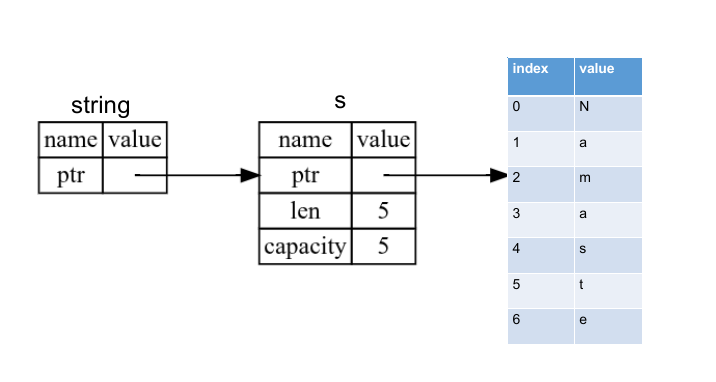 Diagram visualizing references
The opposite of referencing is called dereferencing and denoted by
*.
The act of creating a reference is called borrowing. Borrowed data items cannot be modified by default. Example:
1
2
3
4
5
6
7
8
fn main() {
    let s = String::from("hell");
    change(&s);
}

fn change(some_str: &String) {
    some_str.push_str("o");
}
1
2
3
4
5
6
7
8
9
10
11
12
13
14
  Compiling reference v0.1.0 (/home/i3/c/rust/reference)
error[E0596]: cannot borrow `*some_str` as mutable, as it is behind a `&` reference
 --> src/main.rs:7:5
  |
7 |     some_str.push_str("o");
  |     ^^^^^^^^ `some_str` is a `&` reference, so it cannot be borrowed as mutable
  |
help: consider changing this to be a mutable reference
  |
6 | fn change(some_str: &mut String) {
  |                      +++

For more information about this error, try `rustc --explain E0596`.
error: could not compile `reference` (bin "reference") due to 1 previous error
mutable references
We can also modify borrowed value using mutable reference. Example:
1
2
3
4
5
6
7
8
9
10

fn main() {
    let mut s = String::from("hell");
    change(&mut s);
    println!("{s}");
}

fn change(some_str: &mut String) {
    some_str.push_str("o");
}
1
hello
There can be only one mutable reference at a time. Compiler enforces it. This is to prevent data races which can cause undefined behavior. Example:
1
2
3
4
5
6
7

fn main() {
    let mut s = String::from("hello");
    let r = &mut s;
    let r2 = &mut s;
    println!("r = {r}, r2 = {r2}");
}
1
2
3
4
5
6
7
8
9
10
11
12
13
   Compiling reference v0.1.0 (/home/i3/c/rust/reference)
error[E0499]: cannot borrow `s` as mutable more than once at a time
 --> src/main.rs:4:14
  |
3 |     let r = &mut s;
  |             ------ first mutable borrow occurs here
4 |     let r2 = &mut s;
  |              ^^^^^^ second mutable borrow occurs here
5 |     println!("r = {r}, r2 = {r2}");
  |                    - first borrow later used here

For more information about this error, try `rustc --explain E0499`.
error: could not compile `reference` (bin "reference") due to 1 previous error
Data races can occur due following:
- Two or more pointers access the same data at same time.
- At least one of the pointer is used to modify the data.
- There is no mechanism used to synchronize the data.
We cannot have multiple mutable references at the same time. However, we can have mutltiple mutable references which are active at different time, say in different scope. Example:
1
2
3
4
5
6
7
8
9
10
11
12

fn main() {
    let mut s = String::from("rust");
    {
        let r = &mut s;
        r.push_str("r");
        println!("r = {r}");
    }
    let r2 = &mut s;
    r2.push_str("r2");
    println!("r2 = {r2}");
}
1
2
r = rustr
r2 = rustrr2
However, there is no restriction on how many immutable references we have. Examples:
1
2
3
4
5
6
7
8

fn main() {
    let s = String::from("rust");
    let r = &s;
    let r2 = &s;
    let r3 = &s;
    println!("{r}, {r2} and {r3}");
}
1
rust, rust and rust
Also, we cannot have mutable and immutable reference at the same time for obvious reasons. Example:
1
2
3
4
5
6
fn main() {
    let mut s = String::from("rust");
    let r = &s;
    let r2 = &mut s;
    println!("r ={r} and r2 ={r2}");
}
1
2
3
4
5
6
7
8
9
10
11
12
13
   Compiling reference v0.1.0 (/home/i3/c/rust/reference)
error[E0502]: cannot borrow `s` as mutable because it is also borrowed as immutable
 --> src/main.rs:4:14
  |
3 |     let r = &s;
  |             -- immutable borrow occurs here
4 |     let r2 = &mut s;
  |              ^^^^^^ mutable borrow occurs here
5 |     println!("r ={r} and r2 ={r2}");
  |                   - immutable borrow later used here

For more information about this error, try `rustc --explain E0502`.
error: could not compile `reference` (bin "reference") due to 1 previous error
Note: Reference’s scope starts from where it is introduced and ends when it is last used (instead of when } is encountered). So following compiles.
1
2
3
4
5
6
7
8
9
fn main() {
    let mut s = String::from("rust");
    let r = &s;
    let r2 = &s;

    println!("{r} and {r2}");
    let r3 = &mut s;
    println!("{r3}");
}
1
2
rust and rust
rust
dangling references
In languages like C, there is possibility of having pointer point to location in heap memory which has been freed, which are called dangling pointer. In Rust analogous dangling references can be created but compiler won’t allow code to compile with dangling references. Example:
1
2
3
4
5
6
7
8
9
10

fn main() {
    let s = dangle();
    println!("{s}");
}

fn dangle() -> &String {
    let s = String::from("ink");
    &s
}
1
2
3
4
5
6
7
8
9
10
11
12
13
14
15
16
17
18
19
20
   Compiling reference v0.1.0 (/home/i3/c/rust/reference)
error[E0106]: missing lifetime specifier
 --> src/main.rs:6:16
  |
6 | fn dangle() -> &String {
  |                ^ expected named lifetime parameter
  |
  = help: this function's return type contains a borrowed value, but there is no value for it to be borrowed from
help: consider using the `'static` lifetime, but this is uncommon unless you're returning a borrowed value from a `const` or a `static`
  |
6 | fn dangle() -> &'static String {
  |                 +++++++
help: instead, you are more likely to want to return an owned value
  |
6 - fn dangle() -> &String {
6 + fn dangle() -> String {
  |

For more information about this error, try `rustc --explain E0106`.
error: could not compile `reference` (bin "reference") due to 1 previous error
In the error message it is clearly suggested that borrowed value becomes invalid, so ownership transfer better suited (i.e. returning String instead of &String).
the rules of references
- At any given time, we can have either one mutable reference or any number of immutable references.
- References must always point to valid data.
the slice type
The slice is a kind of reference that let us access contiguous sequence of elements in a collection. Hence, variable with type slice does not own it.
string slices
A string slice is a reference to a contiguous sequence of a char (or UTF code) comprising the String. The type of string slice is &str. We create slices by specifying start_index and end_index inside the brackets. start_index is same as index of the first character of the slice and end_index is one more than index of the last character of the slice. Example:
1
2
3
4
5
6
7
8
9
10
11
12
13
fn main() {
    let s = String::from("This is one short sentence.");
    let slice = &s[5..8];
    let slice2 = &s[..5]; // start_index is assumed to be 0
    let slice3 = &s[8..]; // end_index is assumed to be length of s
    let slice4 = &s[..]; // start_index = 0 & end_index = length of s

    let array_of_slices = [slice, slice2, slice3, slice4];

    for i in array_of_slices {
        println!("{i}");
    }
}
1
2
3
4
is
This
one short sentence.
This is one short sentence.
If we are working with UTF-8 string, we need make sure that string slice range indices occur at valid UTF-8 character boundaries. If we create slice somewhere in the middle of the multibyte character, then our program will crash.
string literals as slices
String literals are stored in the binary of the executable. When we use string literals like let s = "text";, we are actually referring to the immutable reference. The type of string literal is &str.
In parameter of funcion, we should prefer
&strover&String, because it will work with the both types.
other slices
There are other kind of slices that work on collections. Example:
1
2
3
4
5
fn main() {
    let a = [1, 2, 3, 4, 5, 6];
    let slice = &a[2..];
    println!("{:?}", slice);
}
1
[3, 4, 5, 6]
Above slice has the type &[i32]. It works similarly to string slices.
Structs
The struct helps us to group different data type and give each member type a meaningful name.
defining and instantiating structs
Instead of verbal description, here’s example:
1
2
3
4
struct struct_name {
  field_name : data_type,
  ...
}
We can create instance of struct by specifying the key: value pairs inside the curly bracket. Example:
1
2
3
4
5
6
7
8
9
10
11
12
13
14
15
16
17
18
19
20
21

struct User {
    active: bool,
    username: String,
    email: String,
    sign_in_count: u64,
}

fn main() {
    let user = User {
        sign_in_count: 1,
        email: String::from("a@g.com"),
        username: String::from("blow"),
        active: true,
    };
    println!("Values of the various field");
    println!("  active: {}", user.active);
    println!("  username: {}", user.username);
    println!("  email: {}", user.email);
    println!("  sign in count: {}", user.sign_in_count);
}
1
2
3
4
5
Values of the various field
  active: true
  username: blow
  email: a@g.com
  sign in count: 1
Since value and their field name are used, so the order doesn’t matter. For accessing individual field members, . operator is used as shown above. . operator can also be used to modify the data of struct’s field if mutable instance of the struct is declared like user.active = false;.
Rust does not allow only selected field be mutable and rest be immutable. Either all the field of the struct is mutable or none.
If we are initializing a struct with values contained in variables with same name as the field name then we could forgo the field name. Example:
1
2
3
4
5
6
7
8
9
10
11
12
13
14
15
16
17
18
19
20

struct User {
    active: bool,
    username: String,
    email: String,
    sign_in_count: u64,
}

fn create_user(email: String, username: String) -> User {
    User {
        active: true,
        username,
        email,
        sign_in_count: 1,
    }
}
fn main() {
    let user = create_user("hello@g.com".to_string(), "rustoc".to_string());
    println!("sign in count: {}", user.sign_in_count);
}
1
sign in count: 1